Views: 0 Author: Site Editor Publish Time: 2026-04-08 Origin: Site


Section | Summary |
Preparation and Powering On | Steps to ensure your Bamboo Bluetooth Speaker is sufficiently charged and ready for initial activation. |
Enabling Pairing Mode | How to trigger the discovery phase of the Bamboo Bluetooth Speaker to make it visible to other devices. |
Connecting via Smartphone or PC | Detailed walkthrough for syncing the Bamboo Bluetooth Speaker across various operating systems like iOS, Android, and Windows. |
Troubleshooting Connection Issues | Solutions for common pairing failures, signal interference, and reset procedures for the Bamboo Bluetooth Speaker. |
Enhancing Audio Performance | Tips on optimizing placement and settings to get the best sound quality from your Bamboo Bluetooth Speaker. |
Maintenance and Sustainability | Best practices for caring for the bamboo exterior and battery health of your Bamboo Bluetooth Speaker. |

To begin the connection process, ensure that your Bamboo Bluetooth Speaker is fully charged by connecting it to a USB power source and then toggling the power switch to the "On" position.
Before attempting any wireless synchronization, hardware readiness is the most critical factor. Most Bamboo Bluetooth Speaker models utilize a lithium-ion battery that requires an initial charge of at least two hours to reach stable voltage levels. Using a standard 5V USB adapter ensures that the internal circuitry receives consistent power, preventing mid-pairing shutdowns that can lead to firmware glitches.
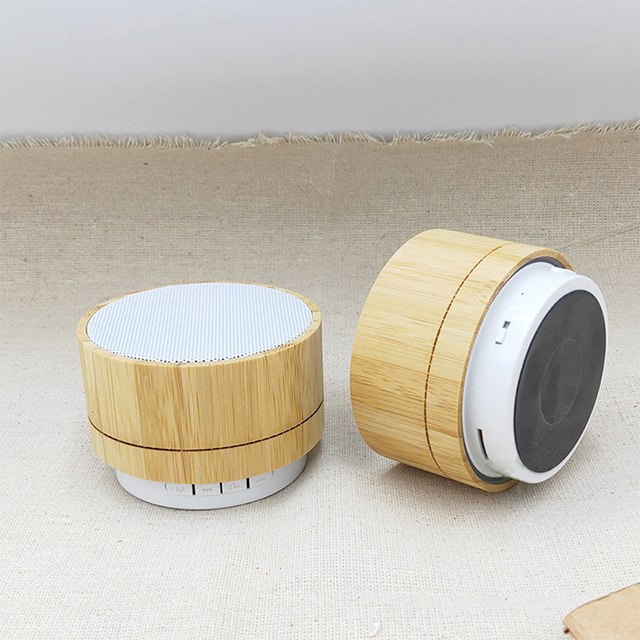
Once the device has sufficient power, locate the power button or switch, which is often integrated seamlessly into the bamboo casing to maintain a minimalist aesthetic. Upon turning it on, listen for a startup melody or watch for a small LED indicator located behind the speaker mesh or on the base. This indicates that the internal Bluetooth module has been energized and is ready to initialize the handshake protocol.
In a B2B context, ensuring that the Bamboo Bluetooth Speaker is properly initialized is the first step in quality control. Whether you are testing units for a retail display or preparing a bulk shipment for a corporate gift event, verifying that the power cycle functions correctly prevents future support requests. A stable power foundation is the prerequisite for all subsequent wireless interactions.
To make the Bamboo Bluetooth Speaker discoverable, you must enter pairing mode by either holding down the play/pause button for three seconds or waiting for the LED to flash rapidly, signaling it is searching for a host.
Pairing mode is the state where the Bamboo Bluetooth Speaker broadcasts its Service Set Identifier (SSID) to surrounding devices. Unlike standard peripherals, a Bamboo Bluetooth Speaker might not automatically enter this mode if it was previously paired with another device. By manually triggering the pairing sequence, you override previous connections and open a window for a new encrypted link to be established between the speaker and the transmitter.
Most high-quality Bamboo Bluetooth Speaker units use Bluetooth 5.0 or higher, which offers a broader range and faster discovery times. When the LED starts flashing—usually in a blue or white color—the device is actively sending out "advertisement packets." During this phase, it is vital to keep the Bamboo Bluetooth Speaker within one meter of the connecting device to minimize signal attenuation and ensure a fast, secure handshake.
If your Bamboo Bluetooth Speaker features voice prompts, you may hear a notification such as "Pairing" or "Searching for connection." This audible feedback is particularly useful in bamboo-clad devices where visual indicators might be subtle to preserve the natural look of the wood. Ensuring the device is in this active search state is the only way to find it in your smartphone or computer's Bluetooth menu.
Connecting a Bamboo Bluetooth Speaker involves accessing the Bluetooth settings on your host device, scanning for "Bamboo Speaker" or the specific model number, and confirming the pair request to bridge the two units.
On mobile platforms such as Android or iOS, the process is streamlined. You navigate to the settings menu, toggle Bluetooth to the "On" position, and wait for the Bamboo Bluetooth Speaker to appear under the "Available Devices" list. Once you tap the name, the smartphone sends a pairing request. In most modern versions of the Bamboo Bluetooth Speaker, no PIN code is required, though older models might occasionally prompt for "0000" or "1234."
For desktop users on Windows or macOS, the steps are similar but require navigating through the "Devices" or "System Settings" panel. When connecting a Bamboo Bluetooth Speaker to a PC, the operating system may need a moment to install the necessary A2DP (Advanced Audio Distribution Profile) drivers. This profile is what allows the Bamboo Bluetooth Speaker to receive high-quality stereo audio streams rather than just low-bitrate communication signals used for phone calls.
Device Type | Connection Path | Key Consideration |
Android Smartphone | Settings > Connected Devices > Pair New Device | Ensure "Media Audio" is checked in settings. |
Apple iPhone | Settings > Bluetooth > Other Devices | Keep the screen active during the search. |
Windows Laptop | Settings > Bluetooth & Devices > Add Device | Check if Bluetooth is enabled in the Action Center. |
MacBook | System Settings > Bluetooth | Look for the speaker icon in the menu bar for quick switching. |
If your Bamboo Bluetooth Speaker fails to connect, clear the pairing history on both the speaker and your phone, ensure there are no physical obstructions, and restart both devices to refresh the wireless signal.
Connection failures are often caused by "signal congestion" or "device memory." If the Bamboo Bluetooth Speaker has been paired with multiple laptops or phones in an office or home environment, it may try to reconnect to the "strongest" known signal rather than the one you are currently using. To fix this, you should "Forget this Device" in your phone's Bluetooth settings and perform a hard reset on the Bamboo Bluetooth Speaker by holding the power button for 10 seconds.
Physical interference is another common hurdle. While the wooden shell of a Bamboo Bluetooth Speaker is relatively transparent to radio waves, large metal objects, microwave ovens, or 2.4GHz Wi-Fi routers placed directly between the speaker and the source can cause audio stuttering. Maintaining a clear line of sight within a 10-meter range usually resolves these "skipping" audio issues and ensures a stable stream.
Furthermore, check the battery level. Many Bamboo Bluetooth Speaker models enter a low-power mode when the battery drops below 10%, which significantly weakens the Bluetooth radio's transmission power. If the connection remains unstable, plugging the Bamboo Bluetooth Speaker into a charger often provides the necessary current to stabilize the wireless chip and maintain the link.
To maximize the sound quality of your Bamboo Bluetooth Speaker, place the unit on a solid wooden or stone surface to take advantage of its natural acoustic resonance and ensure your source device is using a high-quality audio codec.
The material properties of bamboo are unique; it is a dense yet flexible grass that acts as a natural resonance chamber. When you use a Bamboo Bluetooth Speaker, the vibrations from the internal driver are amplified by the wood's grain. To enhance this effect, placing the speaker near a wall or in a corner can boost the lower frequencies, providing a warmer, deeper bass response that complements the sustainable design.
Audio Source Bitrate: Always stream music at 320kbps or use lossless formats to ensure the Bamboo Bluetooth Speaker has enough data to reproduce clear highs and lows.
Equalizer Settings: Adjust your phone's EQ to "Flat" or "Rock" to see which profile best suits the natural acoustics of the bamboo housing.
Distance and Interference: Keep the source device within 5 meters for the most stable high-bitrate transmission.
From a B2B perspective, highlighting these acoustic advantages is key to marketing the Bamboo Bluetooth Speaker. Unlike plastic competitors, the bamboo shell offers a "warmth" to the sound that is highly sought after by audiophiles and eco-conscious consumers alike. Training staff or clients on these placement tips ensures they get the best possible ROI from their audio equipment.
Caring for a Bamboo Bluetooth Speaker involves keeping the exterior dry, avoiding extreme temperature fluctuations that might crack the wood, and managing charge cycles to extend the internal battery life.
Because the Bamboo Bluetooth Speaker is made from natural organic material, it requires slightly different care than standard plastic electronics. You should clean the surface with a soft, slightly damp cloth—never use harsh chemicals that could strip the protective coating off the bamboo. Proper maintenance ensures that the Bamboo Bluetooth Speaker remains a beautiful desk accessory while functioning perfectly for years.
The sustainability of a Bamboo Bluetooth Speaker is not just in its materials but also in its longevity. To preserve the battery, try to keep the charge between 20% and 80%. Avoiding full discharges helps the lithium cells last through more charge cycles, reducing electronic waste. As a B2B supplier, emphasizing these care instructions can significantly reduce return rates and increase customer satisfaction.
Finally, remember that the Bamboo Bluetooth Speaker represents a commitment to a greener planet. By following these connection and care steps, you ensure that this eco-friendly technology serves its purpose efficiently. Whether used in a corporate office or a home setting, the Bamboo Bluetooth Speaker stands as a testament to how modern tech can coexist with natural beauty.